

How to deal with an open redirects vulnerability exploit: A case study
Table of Contents
What is an open redirect vulnerability
An open redirect vulnerability occurs when a web application takes a user-supplied input, typically from a query parameter in a URL, and uses it to redirect the user without proper validation or sanitization. Attackers exploit this vulnerability by crafting malicious URLs that appear legitimate to users but actually redirect them to phishing sites, malware distribution pages, or other malicious destinations.
Open redirects are sometimes necessary for certain features of a website and can be very useful to navigate users around a website or a network of website. They can however provide a weak spot in your website’s security.
Useful cases for an open redirect feature
In certain contexts, open redirects can indeed serve useful purposes, enhancing user experience and streamlining navigation. One such case is exemplified by a scenario encountered on a B2B website within the logistics sector. Here, the integration of open redirects was implemented strategically to optimize user journeys, particularly in the context of transactional searches.
In my case, the client’s website was operating a B2B website as well as an ecommerce shop, which lived on a subdomain. Through analysis, it was noticed that the search bar was used to find products, showing a clear transactional intent. But with the shopping functionality on another domain, the search bar would not be able to return those results. The solution was to implement open redirects, so when a user searches for a specific term, they will automatically be redirected to the shop subdomain from where they could continue their journey.
From a user experience perspective, the implementation was a success, as we could see users arriving to the shop via the open redirects and continuing their journey with a purchase.

How the open redirect exploit was noticed
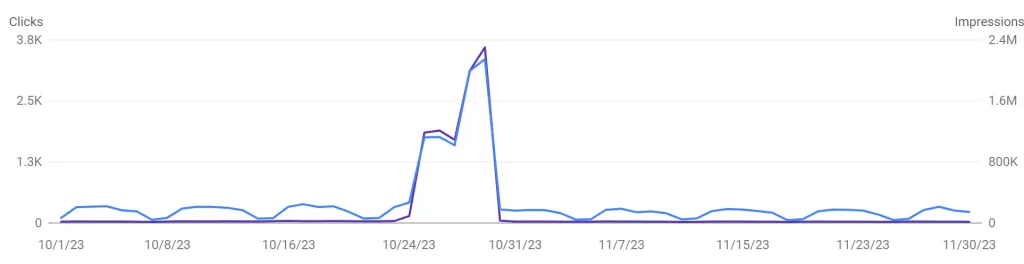
The open redirect exploit was discovered through a routine check of Google Search Console which showed an anomaly in performance. The website surged in impressions and clicks day on day. The website went from thousands of impressions a day to millions overnight, and clicks followed a similar surge (see graph below). It’s important to note here, Google Analytics will most likely not show you any indication of an open redirect exploit. GA4 relies on the gtag being loaded to capture data, but in the case of an open redirect URL, this code (along with any code for a normal page) is not being loaded. Therefore, after seeing a surge of traffic in Search Console that was not reflected in GA metrics, I understood there was a problem.
Going back to Search Console, I started delving into the numbers to uncover the root of the spike. By checking the Pages report, I noticed 4,000+ URLs have been indexed overnight, and tens of thousands of URLs I didn’t recognise were waiting to be indexed. After checking the structure of the new indexed URLs, they all followed a pattern similar to the one above, so I understood someone was exploiting the open redirect feature of the website. At this point, after figuring out the problem, it was time to implement a solution.
NOTE: If you’re someone who is generally not comfortable with Google Search Console (e.g. a developer), another way to spot an open redirects exploit is by checking server logs. Every time an open redirect URL is requested, a log will be kept in the server, so if you see a surge in requests for unfamiliar URLs that follow a similar pattern to the one above, then you may be dealing with an open redirects exploit.
How to deal with an open redirect vulnerability
After diagnosing the problem, it was clear I needed to take swift action. My priorities were as follows:
- Make sure the spammy URLs don’t impact users
- Inform Google that these are not pages I want to rank organically
- Stop the vulnerability from impacting website performance.
The immediate action we took was disabling the open redirects feature on the website. Although this came at the cost of impacting user journeys, this meant that all open redirect URLs (legit and exploited ones) would return a server error. With this first step, users would never be redirected, so they will never land on a potentially dangerous site.
The second step needed was to stop these URLs from being findable, and with such a high number of pages this could potentially impact organic performance. Therefore, I immediately went to Search Console and used a formula to automatically remove all URLs that followed the open redirect structure. With this step, the URLs would never be found by users organically, and it is also a signal to Google that these pages should not be indexed.
After these two steps, the URLs were inaccessible via Google and would return a server error regardless of whether they appeared anywhere else on the internet. Therefore, if /when Googlebot finds and crawls these URLs again, they will return a 5XX status code, which would prevent reindexing at any point after the removal expired. This concluded the damage mitigation part of the process.
Lastly, we had to understand how we can bring the functionality of open redirects back while protecting the website from another exploit. The solution was adding a function to the redirect code that checks the destination. If the destination is not the website we implemented the functionality code for, then return a 404.
Overall, the set of actions was a success. Referring back to the performance chart above, impressions and clicks have fallen to normal levels after the removal was implemented. Furthermore, organic performance was not impacted long term, and the functionality of the website has been reinstated, with added security to ensure the problem doesn’t occur again.